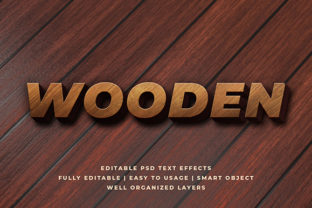
Wooden 3D Text Effect Mockup
A Wooden 3D Text Effect Mockup is a pre-designed digital template that lets you place your own text onto a realistic, high-resolution image of wood grain with dimensional depth—shadows, bevels, lighting, and texture—all already rendered. It’s not a font or a Photoshop filter; it’s a smart-layered PSD or layered PNG file (often compatible with free tools like Photopea) where your words appear as if carved, engraved, or embossed into natural timber.
Why This Matters—Depending on Who You Are
What feels like a small design shortcut to one person can be a strategic asset—or even a time-saving lifeline—to another. The value isn’t fixed. It shifts with your role, resources, and goals.
For Beginners & Hobbyists
If you’re just learning graphic design—or putting together your first Etsy shop banner, wedding sign mockup, or Instagram story—you likely want something that looks professional without needing to master layer styles, lighting angles, or perspective grids. A Wooden 3D Text Effect Mockup gives instant credibility: type in “Handcrafted” or “Family Recipe,” and it appears grounded in warmth and authenticity. No trial-and-error with drop shadows or gradient overlays. Just open, type, save.
Priority here is ease of use and visual confidence. You’re not evaluating rendering fidelity—you’re checking whether the wood tone matches your brand palette and whether the file opens in your current software.
For Freelancers & Small Business Owners
You might be designing for a local coffee roaster launching seasonal packaging, a woodworking studio updating its website hero section, or a wellness brand refreshing its workshop posters. Time is billable—and consistency matters. Using a well-made Wooden 3d Text Effect Mockup means you can generate multiple variations (e.g., “Small Batch,” “Locally Sourced,” “Oak & Honey”) in under five minutes, all sharing the same tactile realism.
Your evaluation leans toward flexibility and commercial safety. Does the license allow client deliverables? Can you adjust wood color or shadow intensity without breaking layers? Is the resolution print-ready for signage or social banners? One mockup that supports both web and small-format print saves more than $20—it saves two revision rounds.
For Educators & Content Creators
Teachers making classroom posters, podcasters designing episode thumbnails, or YouTube creators building intro graphics often need to convey “craft,” “tradition,” or “organic” quickly—and reliably. A Wooden 3D Text Effect Mockup becomes a teaching tool itself: show students how material texture influences perception, or use it to demonstrate contrast between digital sleekness and analog warmth.
Here, learning value and reusability matter most. You’ll prefer mockups with clear layer naming (“Text,” “Wood Base,” “Shadow Overlay”) so students can see structure—not just output. Bonus points if the creator includes a short usage guide or alternative wood tones (walnut, pine, reclaimed barn board) for comparative discussion.
For Marketers & Brand Strategists
You’re thinking beyond aesthetics—you’re assessing alignment. Does this effect support the emotional cues your audience associates with trust, heritage, or sustainability? A Wooden 3D Text Effect Mockup used for a “Certified Organic” label carries different weight than the same effect applied to a tech startup’s slogan. Context shapes meaning.
Your checklist includes tone consistency, accessibility (does text remain legible over busy grain?), and scalability. Will it hold up as a favicon-sized badge? As a full-screen hero headline? You’ll test contrast ratios and export at multiple sizes—not because the mockup demands it, but because your audience’s experience depends on it.
What to Look For—Beyond the Surface
Not all Wooden 3d Text Effect Mockups are built the same. Here’s how practical differences play out:
- Layer integrity: Smart objects let you edit text size and position non-destructively. Rasterized layers force rework every time you tweak spacing.
- Lighting direction: Consistent light source (e.g., top-left) makes composites feel unified—especially when adding other 3D elements like tools or foliage.
- Texture resolution: High-res grain (300+ DPI) avoids pixelation when zooming or printing large-format signs—even if your final output is digital-only.
- File compatibility: PSD files work in Photoshop and Photopea. Some also include Figma or Sketch versions—useful if your team collaborates across tools.
Real-World Use Cases
A blogger promoting a DIY furniture guide drops “Build Your Own Shelf” into a mockup with visible saw marks and soft ambient light—then shares it as a Pinterest pin. The texture invites clicks; the clarity builds trust.
A school art teacher downloads a free Wooden 3D Text Effect Mockup with labeled layers and projects it during class. Students swap fonts and colors, then discuss how serif vs. sans-serif interacts with grain direction—a tactile lesson in typography psychology.
A craft brewery uses the same mockup across three platforms: resized for tap handle labels (crisp 1:1 crop), stretched vertically for Instagram Reels intros (preserving wood continuity), and flattened for email headers (keeping file size under 150KB).
Does It Fit Your Needs Right Now?
Ask yourself:
- Do you need realism—not just “wood-colored” text—but convincing depth and material behavior?
- Is your project tied to values like craftsmanship, sustainability, or heritage—or does it risk feeling clichéd if overused?
- Will you use it once, or build a library for recurring campaigns, seasonal updates, or client templates?
- Do you have 10 minutes—or 10 hours—to achieve this look?
If your answer to #1 and #4 is “yes,” and #3 leans toward “recurring,” investing in a versatile Wooden 3D Text Effect Mockup pays off faster than learning advanced 3D modeling. If you only need subtle wood grain behind a single headline and already own Canva, a simpler overlay might suffice.
There’s no universal “best.” There’s only what works cleanly, ethically, and sustainably for your next real task—whether that’s drafting a logo variant before lunch, preparing a student handout before class starts, or finalizing packaging proofs before tomorrow’s print deadline.