Smile - Peach 3D Text Effect Mockup: When Realism Meets Warmth in Typography Presentation
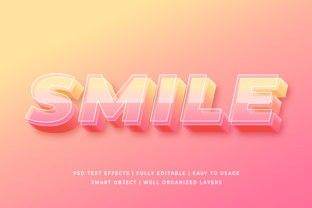
The Smile - Peach 3D Text Effect Mockup is a digital asset designed to showcase typographic designs with dimensional realism and a distinctive, approachable aesthetic. Unlike generic 3D text mockups that rely on metallic sheens or stark shadows, this version uses a soft peach tone—evoking warmth, friendliness, and subtle sophistication—to render text as if extruded from a smooth, matte surface. It’s delivered as a layered PSD or compatible smart-object file, allowing designers to replace placeholder text while preserving lighting, perspective, depth, and material texture.
What Sets the Smile - Peach 3D Text Effect Mockup Apart
Its defining trait isn’t just color—it’s intentional tonal harmony. The peach base isn’t arbitrary; it complements skin tones, natural materials, and lifestyle-oriented branding without competing for attention. The 3D effect avoids harsh bevels or exaggerated gradients, instead using gentle ambient occlusion and directional soft light to suggest volume without visual clutter. This makes it especially effective for projects where readability and emotional resonance matter equally—such as wellness apps, boutique packaging, or personal brand identities.
Unlike flat text overlays or basic layer styles, the Smile - Peach 3D Text Effect Mockup includes realistic surface interaction: subtle texture variation across the extrusion, consistent shadow fall-off on the background plane, and edge softness calibrated to mimic real-world diffusion. These details aren’t merely decorative—they reduce cognitive load for viewers by grounding the text in a believable spatial context.
How It Fits Within Broader Mockup Categories
Mockups fall along several practical axes: realism level (photographic vs. stylized), flexibility (editable layers vs. static PNG), and stylistic intent (corporate, playful, minimalist, organic). The Smile - Peach 3D Text Effect Mockup sits toward the middle of the realism spectrum—not photorealistic like studio-shot product mockups, but more grounded than abstract vector-based effects. Its strength lies in bridging presentation and personality: it conveys dimensionality while retaining brand-aligned warmth.
Compared to monochrome or grayscale 3D text mockups, the peach tone introduces immediate emotional signaling. A black-on-white 3D mockup might suit tech or finance contexts where neutrality is valued, but it lacks the approachability needed for education platforms or family-focused services. Conversely, overly saturated or glossy 3D treatments can feel dated or distracting—especially at small sizes or on mobile interfaces. The Smile - Peach 3D Text Effect Mockup avoids both extremes, offering restrained vibrancy that scales well across formats.
Practical Tradeoffs to Consider
- Color specificity: The fixed peach base limits direct use with high-contrast or dark-themed designs. While blending modes or adjustment layers can shift tone, doing so may compromise the intended warmth or require additional retouching.
- Typography constraints: Very thin, ultra-light, or highly condensed fonts may lose legibility when rendered with the mockup’s gentle extrusion. It performs best with medium-weight sans-serifs or rounded typefaces where stroke consistency supports the 3D illusion.
- Background compatibility: The mockup typically assumes a clean, neutral backdrop (e.g., off-white or light gray). Placing it over busy imagery or strong patterns can dilute its impact unless carefully masked or composited.
Where the Smile - Peach 3D Text Effect Mockup Excels
This mockup shines in scenarios where tone and clarity must coexist. For example, a mental health app launching a new feature titled “Breathe” benefits from the softness of peach—reinforcing calm—while the 3D lift adds visual hierarchy without aggression. Similarly, a local bakery presenting a seasonal menu item like “Peach & Honey Loaf” gains cohesion: the color echoes the ingredient, and the dimensional treatment draws the eye without shouting.
It also works well in pitch decks and client presentations where first impressions matter. Because the effect feels tactile and considered—not algorithmically generated—it subtly signals design intentionality. Stakeholders unfamiliar with technical mockup workflows often respond more positively to assets that feel human-scaled and emotionally coherent.
When Another Option Might Be More Appropriate
If your project demands strict brand color fidelity—say, a fintech dashboard requiring precise corporate blue—the Smile - Peach 3D Text Effect Mockup isn’t easily adaptable without compromising its core character. In those cases, a neutral-toned 3D mockup with full hue/saturation control or a parametric tool (like a Figma plugin with adjustable depth and lighting) offers greater precision.
For rapid iteration across dozens of variants—such as A/B testing headline treatments in marketing emails—a fully editable vector-based effect may be faster than opening and updating layered PSD files. Likewise, developers embedding dynamic text in web interfaces will find CSS 3D transforms or WebGL libraries more scalable than static mockups, even if the visual nuance differs.
And if realism is the sole priority—like simulating engraved text on ceramic mugs or laser-etched signage—photographic mockups shot with matching lighting and surface grain will outperform any screen-based 3D interpretation. The Smile - Peach 3D Text Effect Mockup prioritizes expressive utility over literal replication.
Decision Factors Beyond Aesthetics
Consider your workflow constraints. Does your team use Adobe Photoshop exclusively, or do you rely on Affinity Photo, Figma, or browser-based editors? Compatibility affects how smoothly the Smile - Peach 3D Text Effect Mockup integrates. Also weigh frequency of use: if you’ll apply it repeatedly across campaigns, investing time in mastering its layer structure pays off. If it’s for a one-off presentation, simpler alternatives may suffice.
Think about audience expectations too. Designers reviewing your work may appreciate the craft behind a thoughtfully balanced 3D treatment. End users, however, only experience the result—not the method. What matters most is whether the final composition feels trustworthy, clear, and aligned with the message. The Smile - Peach 3D Text Effect Mockup supports that goal when warmth and dimension serve the narrative—not distract from it.
Realistic Integration Tips
To maximize effectiveness, pair the mockup with complementary elements—not contrast. Try setting it against textured paper backgrounds rather than solid colors, or nest it within a soft drop shadow that matches the mockup’s existing light direction. Avoid stacking multiple 3D effects on the same page; one strong dimensional anchor is clearer than several competing depths.
Test legibility early. Zoom out to 50% view—does the text remain distinct? Check on both light and dark mode previews if delivering digitally. And remember: the mockup enhances typography, not replaces thoughtful type selection. A poorly spaced or low-contrast font won’t improve simply because it’s rendered in peach 3D.
Final Perspective
The Smile - Peach 3D Text Effect Mockup isn’t a universal solution—but few specialized tools are. Its value emerges in focused, human-centered contexts where tone carries as much weight as structure. It reflects a design philosophy that treats color, form, and function as interdependent—not interchangeable. That makes it worth evaluating not just for what it does, but for how quietly it supports the ideas you’re trying to communicate.
Whether you choose it depends less on trend alignment and more on fit: Does your project benefit from quiet confidence rather than bold assertion? Does your audience respond to warmth before polish? If yes, the Smile - Peach 3D Text Effect Mockup offers a nuanced, production-ready way to bridge concept and perception—without overpromising or oversimplifying.